
Phenakistoscope
📖 Introduction
The phenakistoscope is an animation device invented almost simultaneously around the early 1830s by Belgian physicist Joseph Plateau and Austrian mathematician Simon von Stampfer. It was the most influential "moving picture" machine before the birth of cinema: viewers looked at the disc pattern through slits around its edge, and the strobe effect of the slits sliced the continuous rotation into a sequence of still frames that played back as animation.
MathArt reproduces this principle digitally: the disc spins at a given speed while the displayed angle snaps to a 360°/N grid — no physical slits required, the on-screen "strobe" alone brings the pattern to life. The scene's behavior is modeled after the open-source web tool PhenaSpin.
Core capabilities:
- Classic strobe animation: spin speed (RPM) + strobe step count N reproduce the classic illusion, with a live step-rate diagnostic that checks alignment with the render frame rate
- Four pattern types: Wave, Bloom, Morph, and local Image
- Eight base shapes: arc, petal, dot, wedge, bar, diamond, star, chevron
- Kaleidoscope mirroring: 1×/2×/4×/8× sector mirroring (Bloom/Morph)
- Spin-up animation: a Spin Up clip ramps the disc from 0 to the target speed with constant or smooth acceleration
- Randomize: one click generates a random combination with the spin speed solved to align exactly with the current frame rate
- MP4 export: duration equals the sum of enabled timeline clips; frame-deterministic rendering identical to preview
🧮 Mathematical Background
Rotation and Strobe Quantization
The disc rotates at a constant angular velocity:
In strobe mode the displayed angle does not use θ directly — it snaps to the nearest step:
Continuous mode skips quantization: the disc simply rotates, which is useful for inspecting the pattern itself.
Why the Pattern "Moves"
The key principle in one sentence: the pattern's sequence of variation around the circle is the animation frame sequence played back over time. Each strobe step advances the viewpoint by 360°/N — effectively swapping in the next cell of the pattern. Neighboring cells carry "neighboring frames", and the steps play them as animation.
This yields an iron law: a fully symmetric pattern always freezes. If every sector is drawn identically (for example N = M), each step shows an identical picture and the disc appears motionless; adjacent cells must differ in phase for animation to exist.
Step Rate and Frame-Rate Alignment
The step rate (steps per second) and frames per step:
Two criteria (diagnosed live in the inspector):
f_step ≤ FPS: otherwise a single frame spans multiple steps and frames get dropped (skipping artifacts);- Frames per step close to an integer: otherwise the strobe cadence speeds up and slows down.
k = M/N: Sector Animation Advance (Bloom/Morph)
For Bloom and Morph, the animation phase = sector index / M, and each strobe step advances M/N sectors:
| k = M/N | Behavior |
|---|---|
| k = 1 (N = M) | Sector lattice freezes, 1 frame per step — smoothest but often too subtle |
| k = 2 (N = M/2, recommended) | Lattice still freezes and each step advances 2 frames — the most striking animation |
| k ≥ 3 | Animation starts to jump |
| N does not divide M | The lattice itself drifts slowly, adding a flowing feel |
Wave Principle (WAVE)
Wave mode does not use sector count M or mirroring: the mark count of each concentric ring ramps smoothly from N − spread (inner) to N + spread (outer). A ring with exactly N marks re-aligns cell-by-cell after each step and appears "frozen"; a ring with N ± i marks creeps ±i cells per step — stacking rings with different offsets produces the classic outward ripple. With spread = 0 all rings have the same mark count and the pattern degrades into rigid rotation.
Spin-Up Ramp
The Spin Up clip ramps angular velocity from 0 to the target ω: LINEAR is strict constant acceleration (default), SINE_IN_OUT eases in and out. In strobe mode the acceleration appears as progressively shorter step intervals — the effect grows "from subtle to obvious". Angles are evaluated in closed form: each frame depends only on time, so preview and export match frame for frame.
🖥️ Interface Overview
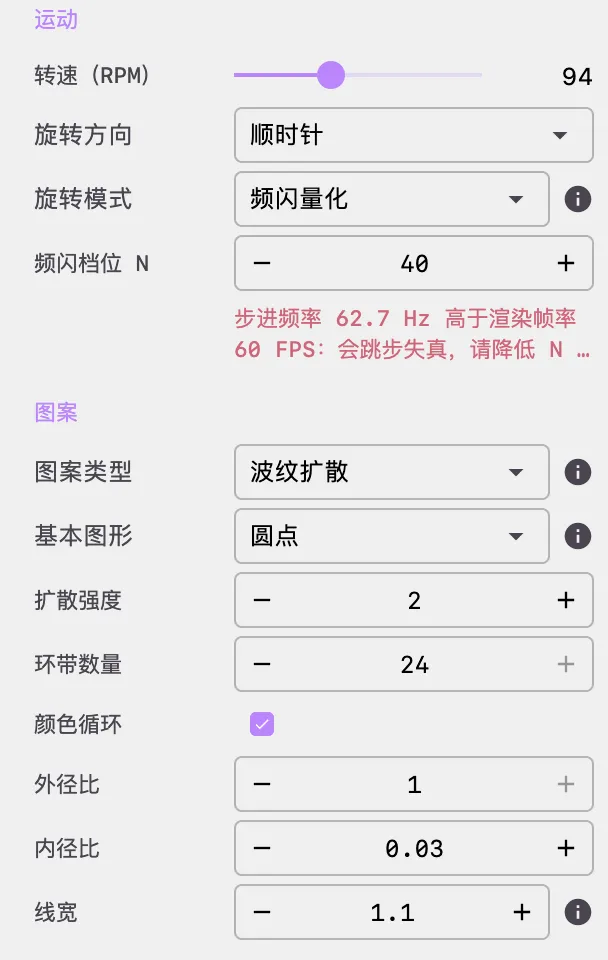
All controls live in the inspector panel on the right, organized into three groups with a "Randomize" button on top. Every parameter in this scene applies immediately — no Apply button needed:
- Motion: spin speed, spin direction, rotation mode, strobe steps N, and the step-rate diagnostic
- Pattern: pattern type, base shape, ring count, sectors/mirror, radii, line weight, fill, color cycle, and image path
- Appearance: background color and gradient palette
⚙️ Configuration Guide
1. Motion
- Spin Speed (RPM): the disc's true physical speed, slider range 1–240. It determines the step rate: steps/s = N × RPM ÷ 60
- Spin Direction: clockwise / counter-clockwise
- Rotation Mode:
- Strobe: the displayed angle snaps to the 360°/N grid, producing the strobe animation (the heart of this scene)
- Continuous: no quantization, plain continuous rotation
- Strobe Steps N: the number of quantization steps (2–180). N is NOT the video FPS — it is how many sampling slots the circle is divided into; the visible angle jump is the expected strobe behavior, not a rendering glitch
- Step-rate diagnostic (read-only, live):
- Red: step rate exceeds the render frame rate — steps will be skipped → lower N or spin speed
- Neutral: frames per step is non-integer, cadence slightly uneven → fine-tune N or spin speed
- Aligned: shows the current step rate and frames per step for reference
2. Pattern
Pattern Type
| Type | Principle | Dedicated parameters |
|---|---|---|
| Wave | Ring mark counts ramp from N−spread to N+spread, producing an outward wave | Wave Spread |
| Bloom | Tiles travel radially back and forth across their rings, scaling with the journey | Radial Cascade, Sector Count M, Mirror |
| Morph | Tiles expand and contract, layered with a radial sinusoidal weave | Radial Cascade, Sector Count M, Mirror |
| Image | Local image shown whole / sliced / mirrored into a kaleidoscope | Image Path |
Tip: switching pattern type automatically applies a proven starting configuration (e.g. switching to Image sets up full-image display), so you usually see a working effect right after switching.
Base Shapes (Eight Tiles)
Arc (the classic scribe line), petal (with a windmill tilt), dot, wedge, bar, diamond, star, and chevron. Tiles are the basic units every motif animates; tile sizes alternate between neighboring rings so their relative motion stays visible.
Common Pattern Parameters
- Ring Count (1–24): number of radial rings. Wave works best with 5–8; Bloom prefers wide rings (3–5) for long travel, Morph more rings (5–8)
- Wave Spread (0–4, Wave only): how far mark counts deviate from N across the radius; use ≥2. At 0 all rings share the same count and only rigid rotation remains
- Radial Cascade (0–2, Bloom/Morph only): offsets animation phase between inner and outer rings, creating an inward/outward bloom wave
- Sector Count M (1–96, Bloom/Morph only): recommended N = M/2 (the k = 2 sweet spot)
- Mirror (1×/2×/4×/8×, Bloom/Morph only): sector mirroring for kaleidoscope symmetry
- Color Cycle: when on, colors flow with the pattern phase, making the animation easier to read; when off, colors depend only on the ring
- Outer / Inner Radius: disc radii as a fraction of half the screen's short edge; the inner radius automatically stays below the outer one
- Line Weight (0–8): outlines shapes when Fill is on; becomes the main stroke when Fill is off (use ≥1.5 on dark backgrounds, or keep Fill on); in Image mode it is the sector divider line (0 = off)
- Fill: solid tiles / outline only
Image Mode
- Path resolution order: absolute path → relative to the scene root → built-in resource folder; if all fail, an error card lists every path tried — no silent fallback
- Full-image display (recommended starting point): Sector Count M = 1 and Mirror 1× — the image is circle-cropped, shown as-is, and rotates rigidly with the disc
- Slice mode: with M > 1 the image is cut into M vertical strips arranged around the disc; kaleidoscope: with Mirror > 1× the strips are reflected
- Image mode ignores palette, ring count, fill, and base shape; images longer than 4096 px on a side are automatically downsampled proportionally
- Tip: absolute paths may break when sharing scene files — put the image next to the scene and use a relative path
3. Appearance
- Background: dark backgrounds best bring out strobe patterns
- Gradient: the same gradient editor as other scenes — Manual (node editing + random strategies), Cosine, and Curve modes, up to 25 color stops
Randomize
One click generates a random combination: it picks the pattern type, tile shape, and ring count, then solves for a spin speed aligned to the current frame rate at 2–3 whole frames per step — no more trial-and-error aligning the strobe cadence. Don't like it? Click again.
🎬 Animation and Timeline
The phenakistoscope timeline has only two clip types:
- Wait: the disc spins at constant speed for the given seconds
- Spin Up: ramps from 0 to the target speed, 3 s by default; easing LINEAR is strict constant acceleration (default), SINE_IN_OUT eases in and out. The disc is fully at rest before the clip starts; the ramp anchors at the clip's start time
Duration rule: video duration = the sum of all enabled timeline clips; a Spin Up clip counts both as ramp time and toward total duration. For example, [Spin Up 3s][Wait 5s] exports an 8-second video. In preview the disc keeps spinning after the clips finish; recording stops automatically when the timeline ends.
{
  "timeline": [
    { "type": "phenakistoscope_spin_up", "duration": 3.0, "easing": "LINEAR", "enabled": true },
    { "type": "wait", "duration": 5.0, "enabled": true }
  ]
}
Video export reuses the standard MP4 pipeline: each frame's angle is evaluated in closed form from time alone, using the same evaluator as preview, so any frame can be reproduced exactly.
📐 Classic Examples
| Goal | Recommended configuration |
|---|---|
| Bloom (default new scene) | Bloom + Dot, N = M = 15, Mirror 2×, 13 rings, 94 RPM, Color Cycle on |
| Most striking sector animation | Bloom / Morph, even M in 8–16, N = M/2, spin speed aligned per the diagnostic |
| Classic ripple wave | Wave + Arc or Dot, 5–8 rings, Spread ≥2, Fill on, N = 10–12, 120–240 RPM |
| Full-image display | Image, Sector Count M = 1, Mirror 1×, divider 0, lower speed (20–60 RPM) for easy viewing |
| Image kaleidoscope | Image, M > 1 or Mirror 2×/4×, with a lower speed |
The built-in examples ripple_disc6 (bloom disc) and image_kaleido (full image + spin-up) ship with the app and can be opened directly from the scene graph panel.
❓ FAQ
The disc appears completely motionless
Cause: the pattern is fully symmetric (e.g. N = M with identical sectors) — every step shows the same picture. Full symmetry = frozen.
Solution: set N = M/2 (k = 2); or click Randomize for a working combination; in Wave mode make sure Spread ≥2.
The animation skips steps or stutters
Cause: the step rate exceeds the render frame rate (skipping), or frames per step is non-integer (uneven cadence).
Solution: check the step-rate diagnostic in the Motion group — on the red hint, lower N or spin speed; on the neutral hint, fine-tune the spin speed so frames per step is close to an integer.
The wave effect is barely visible
Solution: keep rings at 5–8 (too many turns into mush); Spread ≥2; enable Fill and Color Cycle; raise the spin speed per the step-rate diagnostic — waves need high speed to show.
The image is cut into strips or distorted
Cause: slicing and mirroring are by design (M > 1 slices, Mirror > 1× reflects); the polar warp of strips into wedge sectors is inherent geometry, not a defect.
Solution: for a faithful full image, set Sector Count M = 1 and Mirror 1×.
The image fails to load
Images resolve in the order "absolute path → path relative to the scene root → built-in resource folder"; if all fail, an error card lists the paths tried. Check the path, or copy the image next to the scene and switch to a relative path.
⚠️ Notes
- N is not the video FPS: strobe steps N is the angle quantization count; the video frame rate is configured separately in export settings
- Immediate application: every parameter rebuilds and applies the scene on commit — no Apply button needed
- Legacy scene compatibility: old ORBIT / SPIRAL patterns render as Wave; removed fields such as loopMode, revolutions, and the initial angle are ignored
- Performance: the whole disc pattern is pre-rendered once into an offscreen texture; each frame is a single rotated blit, so tile count does not affect per-frame cost
- Sharing scenes: absolute image paths may break on another machine — prefer relative paths
📚 References
- PhenaSpin — the behavioral reference for this scene, an online phenakistoscope generator
- Wikipedia: Phenakistoscope — history and principles of the phenakistoscope