
Parametric Surface
📖 Introduction
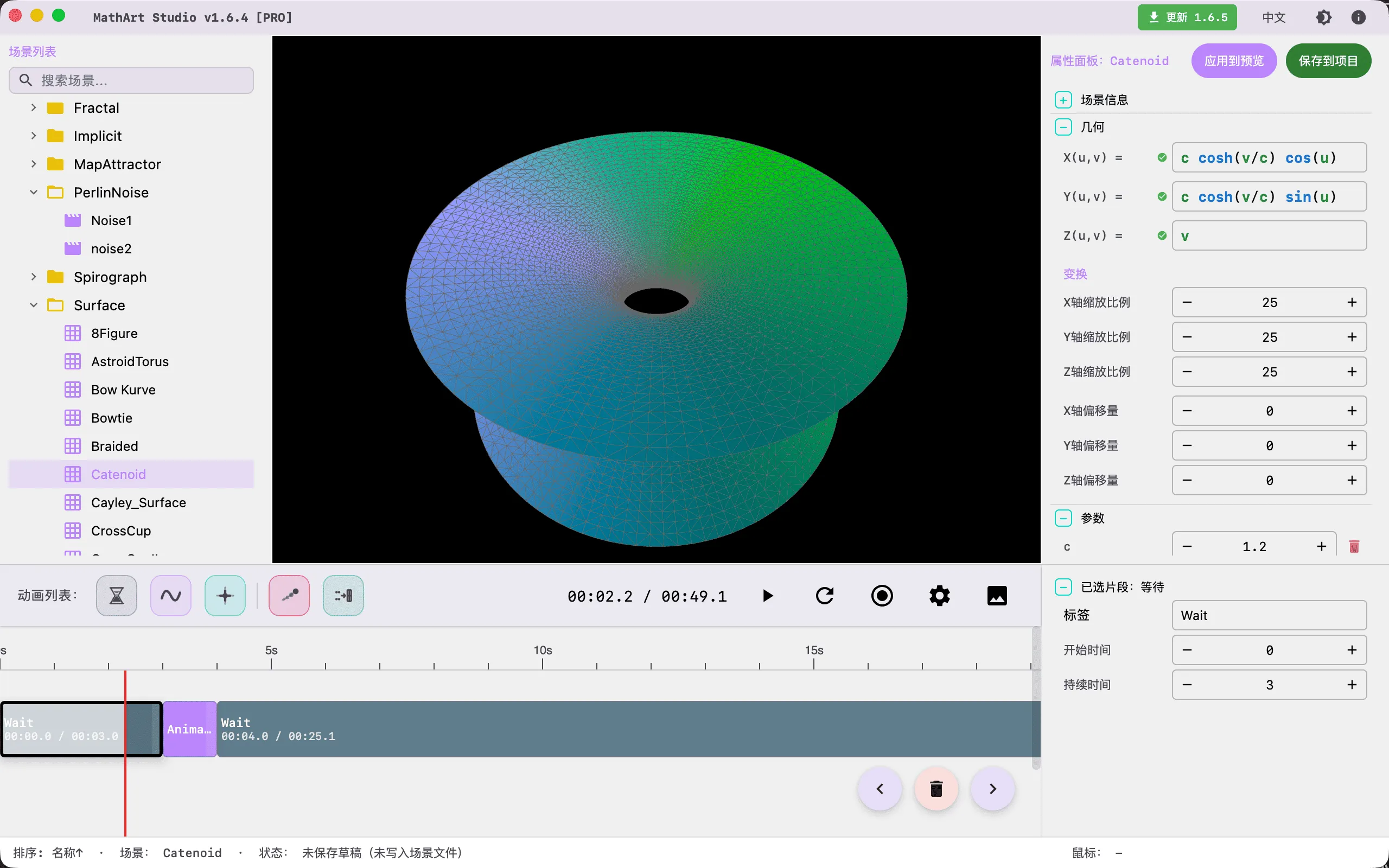
Parametric Surface is one of the most fundamental and powerful scene types in mathematical visualization. It maps a pair of parameters to 3D spatial coordinates , generating an infinite variety of curved geometries — from simple spheres and tori to complex helicoids, Möbius strips, and even stunning mathematical sculptures like the Cornucopia, all precisely expressible through parametric equations.
This scene supports two rendering modes: Particle Point Cloud (POINTS) and Mesh Surface (MESH), each suited to different creative needs. The particle mode excels at showcasing flow effects and trail animations, bringing surfaces to life; the mesh mode presents smooth surface geometry with support for fill, wireframe, materials, and procedural textures, ideal for displaying surface form and lighting effects.
Note: The Parametric Surface scene shares some UI components (such as camera controls, formula display, and gradient palettes) with Fractal, Map Attractor, and Symmetry Chaos scenes, but has its own independent equation input system, parameter domain controls, rendering pipeline, and animation controller, focused specifically on the creation and exploration of parametric surfaces.
Key Capabilities:
- Free Equation Input: Write mathematical expressions directly in the x(u,v), y(u,v), z(u,v) input fields with real-time surface preview
- Dual Rendering Modes: POINTS mode supports particle flow and trail effects; MESH mode supports fill, wireframe, materials, and procedural textures
- CPU/GPU Dual Engine: CPU mode for high-precision rendering with trail effects; GPU mode for high-performance rendering with millions of particles
- Custom Parameter System: Define parameters (e.g., a, R, r) in the Parameters panel and reference them directly in equations, supporting real-time adjustment and animation
- Parameter Domain & Flow Control: Precisely control u, v parameter ranges with periodic boundaries and flow modes for perfect loop animations
- Professional Palette: Supports manual, cosine, and curve gradient modes with automatic closed-loop detection for seamless coloring on closed surfaces
- Full Animation Support: Parameter oscillation animation, camera animation, gradient animation, mode transition animation — all orchestrated through the timeline system
🧮 Mathematical Background
What is a Parametric Surface?
A parametric surface is a fundamental concept in differential geometry. Unlike implicit equations (e.g., defining a sphere), parametric surfaces map a 2D parameter domain to 3D space through three bivariate functions. This representation offers several advantages:
- Intuitiveness: Each parameter value corresponds to a unique point on the surface, making the mapping between parameter domain and surface clear
- Computability: Coordinates can be directly calculated from parameter values without solving equations
- Samplability: Uniformly sampling the parameter domain easily generates mesh or point cloud representations of the surface
- Animatability: Varying parameters over time creates the effect of particles flowing along the surface
Mathematical Definition of Parametric Surfaces
A parametric surface is defined by three bivariate functions:
where and form the parameter domain. You can think of the parameter domain as a piece of "fabric," and the parametric equations define how to "fold" this fabric into a surface in 3D space.
Classic Parametric Surfaces
Sphere:
The sphere is the most basic closed surface. Parameter u controls longitude (rotation around the Z-axis), and parameter v controls latitude (from north pole to south pole):
where , , and is the sphere radius.
Torus:
A torus is formed by combining a large circle (major circle) with a small circle (tube cross-section). Parameter u controls position along the major circle, and parameter v controls position along the tube cross-section:
where , , is the major radius, and is the minor radius.
Helicoid:
The helicoid is a classic example of a minimal surface — imagine a straight line rotating around an axis while simultaneously moving along the axis at a constant speed:
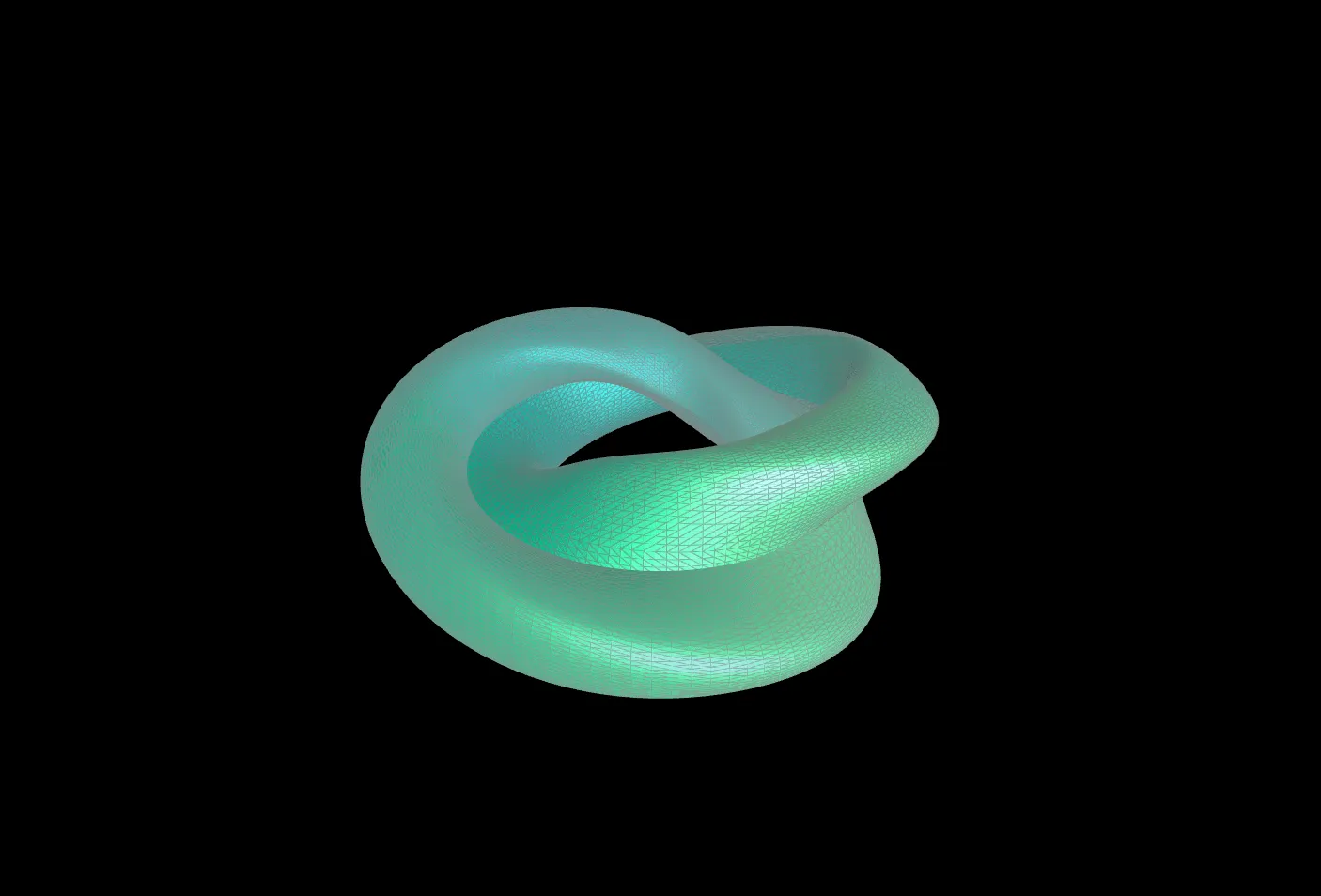
Möbius Strip:
The Möbius strip is the most famous non-orientable surface — it has only one side and one edge. It can be formed by twisting a strip of paper 180° and joining the ends:
where and .
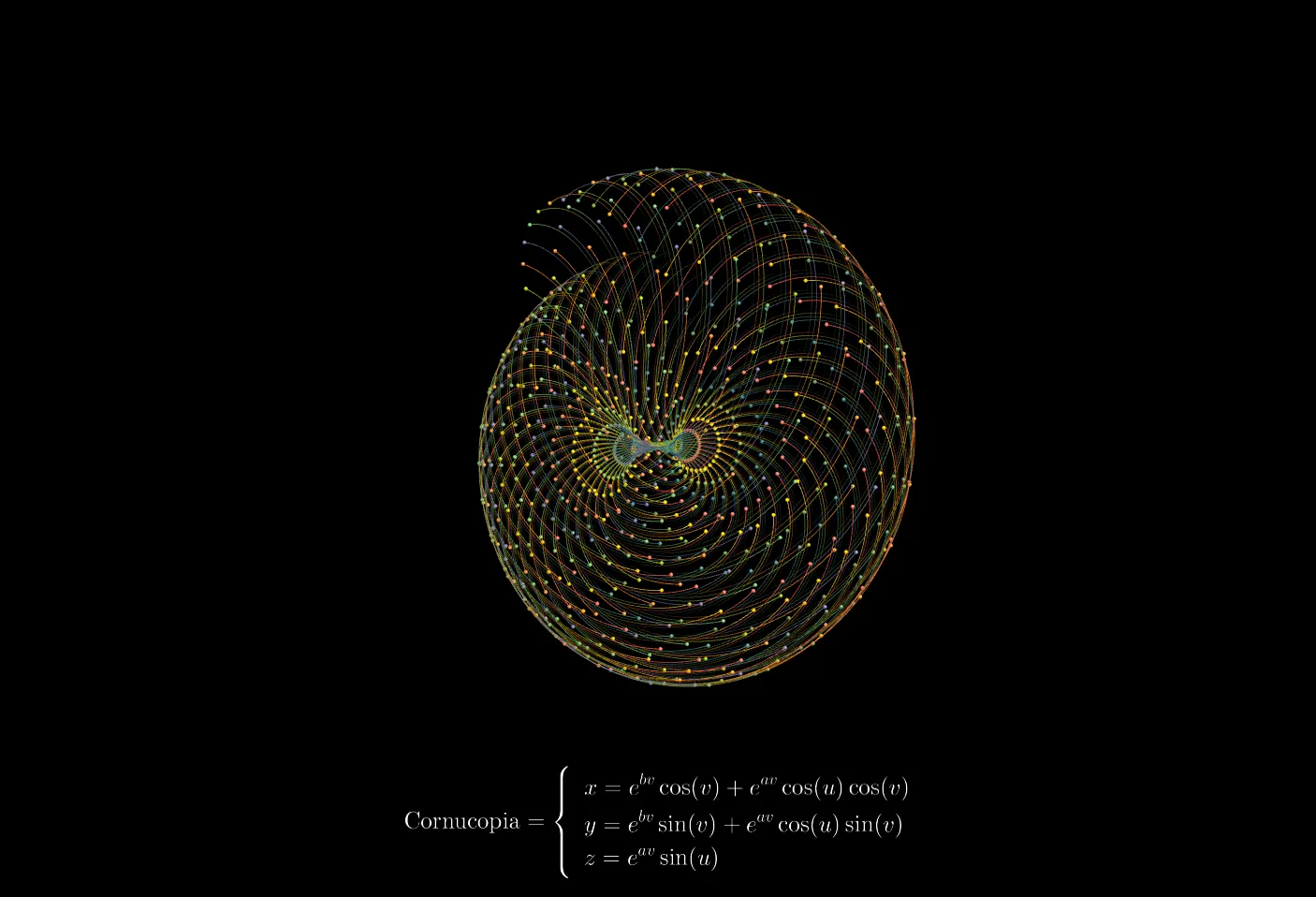
Cornucopia:
The Cornucopia is a spiral horn-shaped surface resembling the Horn of Plenty from Greek mythology. It uses exponential functions to achieve increasing radius, creating an elegant spiral unfolding effect:
where parameter controls the growth rate of the cross-section, and parameter controls the spiral expansion rate.
Relationship Between Parameter Domain and Surface Form
Parameter domain settings directly affect the surface form:
| Parameter Domain | Suitable Surface | Description |
|---|---|---|
| , | Sphere | u traverses longitude once, v from north to south pole |
| , | Torus | Both parameters traverse a full circle |
| , | Helicoid | u controls radial range, v controls rotation |
| , | Möbius Strip | u must traverse two full circles to close |
Historical Background
The study of parametric surfaces traces back to the early days of mathematics. In the 18th century, Leonhard Euler pioneered the systematic study of surface parameterization. In the 19th century, Carl Friedrich Gauss laid the foundations of differential geometry of surfaces in his Disquisitiones Generales circa Superficies Curvas (1827), introducing core concepts such as Gaussian curvature and proving the Theorema Egregium — that curvature is an intrinsic property of surfaces.
Bernhard Riemann further generalized Gauss's work, proposing the concepts of manifolds and Riemannian geometry, laying the groundwork for modern geometry. In the 20th century, parametric surfaces became a core tool in computer graphics — Bézier surfaces, NURBS surfaces, and others are special cases of parametric surfaces, widely used in CAD modeling, animation production, and scientific visualization.
Supported Mathematical Functions
The formula editor supports the following standard mathematical functions:
| Category | Functions | Description |
|---|---|---|
| Trigonometric | sin, cos, tan, asin, acos, atan | Angles in radians |
| Hyperbolic | sinh, cosh, tanh | Hyperbolic sine, cosine, tangent |
| Exponential & Logarithmic | exp, log, ln, log10, sqrt | exp is natural exponential, log/ln is natural logarithm |
| Rounding | floor, ceil, round, sign | floor rounds down, ceil rounds up |
| Others | abs, pow, min, max, atan2 | atan2(y,x) returns the argument of point (x,y) |
Built-in Constants: PI (π ≈ 3.14159), TWO_PI (2π ≈ 6.28318)
Tip: Parameter domain input fields also support expressions such as
2*TWO_PI,PI/4, etc.
🖥️ Interface Overview
All controls are located in the inspector panel on the right, divided into six main sections:
- Geometry: Input surface equations, adjust spatial transforms
- Settings: Select render mode, surface mode, configure parameter domain and simulation parameters
- Camera: Control viewing angles
- Formulas: Display mathematical formulas and annotations in the scene
- Appearance: Adjust background color and gradient palettes
- Parameters: Define custom constants used in equations
⚙️ Configuration Guide
1. Geometry (Geometry Settings)
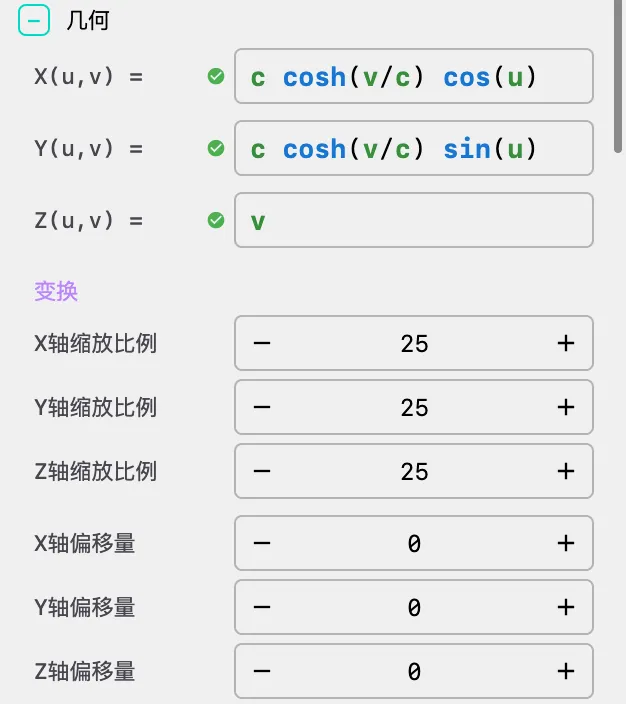
Equation Input
In the Geometry panel, define the parametric equations of the surface through three formula input fields:
- x(u,v): Defines the coordinate function for the X-axis
- y(u,v): Defines the coordinate function for the Y-axis
- z(u,v): Defines the coordinate function for the Z-axis
Formulas can use variables u and v, as well as custom parameters (defined in the Parameters panel). For example, defining a torus:
x = (R + r * cos(v)) * cos(u)
y = (R + r * cos(v)) * sin(u)
z = r * sin(v)
where R and r are custom parameters defined in the Parameters panel.
Tip: Formula input fields support syntax highlighting and real-time validation. Invalid expressions will display a red border and error message.
Secondary Exploration
The x(u,v) / y(u,v) / z(u,v) formula area in the Geometry panel now supports a simplified Explore workflow. It is designed to continue from the current surface and generate nearby variants with clear mathematical rationale.
Workflow:
- Click
Explore - The system generates and immediately applies one filtered nearby variant
- The starting point of the current exploration round is automatically stored as the baseline
- Use
Return To Baselineat any time to restore the original equations from the start of the current exploration round Return To Baselineis always visible; when the current formulas have not diverged from the baseline, the button stays disabled
Current Exploration Logic:
- Results come from whitelisted local formula rewrites plus geometry screening, not from random string generation
- The current explorer is centered on function switching and frequency perturbation
- Function switching mainly targets safe trigonometric swaps such as
sin <-> cos - Frequency perturbation uses a limited discrete multiplier set together with domain validation, avoiding unconstrained expansion
- All results go through stability, similarity, and diversity filtering, favoring candidates that stay in the same family while introducing clear local changes
- The current version no longer exposes
Weak / Medium / Strongstrength levels, and no longer includes nonlinear enhancement, amplitude scaling, phase shifting, or coupling injection
Good Use Cases:
- You already have a good base surface and want to explore nearby variants quickly
- You want to observe how
sin/cosswaps or mild frequency changes affect both static shape anddots / trailsmotion readability - You want to reduce trial-and-error while editing equations by hand
Spatial Transform
- Scale X/Y/Z: Scale multipliers in 3D space, default value 55.0
- Offset X/Y/Z: Position offsets in 3D space, default value 0.0
Usage Tips:
- Adjust scale to control the surface size in the scene
- Adjust offset to position the surface anywhere in the scene
- When the scene contains multiple geometries, use offset to precisely control their relative positions
2. Settings
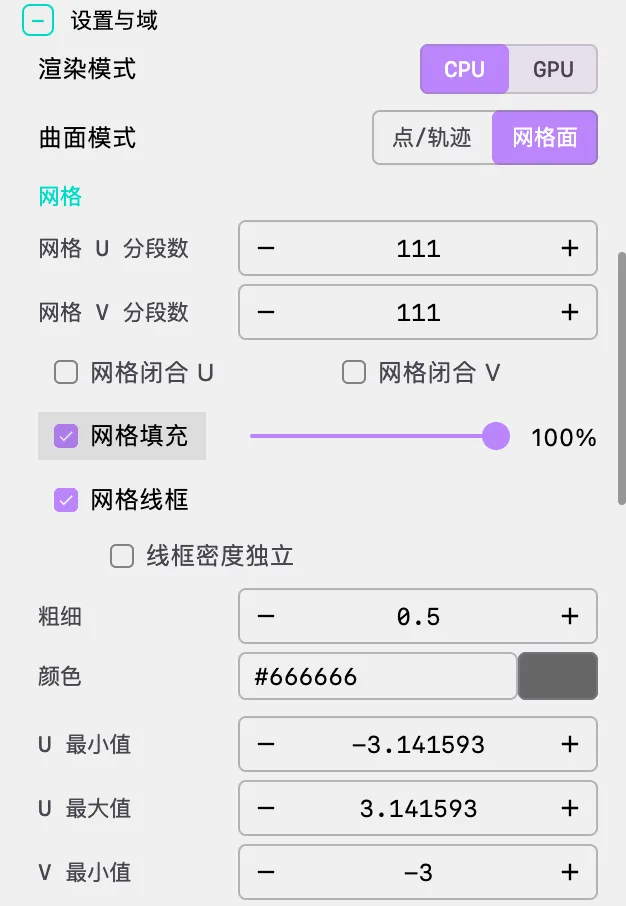
Render Mode
- CPU: High-precision rendering, supports trails and line weight adjustment, ideal for high-quality video export
- GPU: High-performance rendering, supports millions of particles, trails are disabled, ideal for real-time preview and massive point clouds
Important: GPU mode does not support trail effects. Switch to CPU mode if trails are needed.
Surface Mode
- POINTS: Particle point cloud mode, supports flow animation and trail effects
- MESH: Mesh surface mode, supports fill, wireframe, materials, and procedural textures
MESH Mode Exclusive Parameters
Mesh Resolution:
| Parameter | Description | Default | Minimum |
|---|---|---|---|
| u_segments | Number of mesh segments in U direction | 60 | 2 |
| v_segments | Number of mesh segments in V direction | 60 | 2 |
Tip: Higher segment counts produce smoother surfaces but increase rendering overhead. Typically 60-100 segments are sufficiently smooth.
Wrapping Control (for closed surfaces):
| Parameter | Description | Default |
|---|---|---|
| wrap_u | U-direction edge wrapping | Off |
| wrap_v | V-direction edge wrapping | Off |
| wrap_threshold | Wrapping detection threshold | 0.25 |
Important: For closed surfaces (e.g., spheres, tori), you must enable
wrap_uorwrap_v, otherwise the mesh will have gaps at the seams.wrap_thresholdcontrols the sensitivity of seam detection — when the distance between endpoints is less than the threshold multiplied by the mesh diagonal length, the system automatically stitches them together.
Fill & Wireframe:
| Parameter | Description | Default |
|---|---|---|
| fill | Enable mesh fill | On |
| fill_opacity | Fill opacity | 90% |
| wireframe | Enable mesh wireframe | On |
| wireframe_decoupled | Decouple wireframe density | Off |
| wireframe_u_lines | U-direction wireframe lines (decoupled mode) | Same as u_segments |
| wireframe_v_lines | V-direction wireframe lines (decoupled mode) | Same as v_segments |
| wireframe_weight | Wireframe line weight | 1.0 |
| wireframe_color | Wireframe color | #FFFFFF |
Tip: Enabling
wireframe_decoupledallows independent control of wireframe density, unconstrained by mesh segment count. This is useful when you need fine mesh resolution but sparse wireframe lines.
Material & Texture (GPU MESH mode only):
| Parameter | Description | Range |
|---|---|---|
| shininess | Material shininess, controls highlight sharpness | 0-100 |
| ambient | Ambient light color | Hex color value |
| specular | Specular highlight color | Hex color value |
| procedural_texture | Procedural texture type | See table below |
| Procedural Texture | Description |
|---|---|
| None | No texture, uses solid color fill |
| Checkerboard | Checkerboard pattern |
| Metal | Metal texture |
| Ceramic | Ceramic texture |
| Carbon | Carbon fiber texture |
POINTS Mode Exclusive Parameters
Resolution:
| Parameter | Description | Default |
|---|---|---|
| u_segments | Number of particles in U direction | 60 |
| v_segments | Number of particles in V direction | 60 |
Important: Total particle count = u_segments × v_segments. Excessive resolution causes performance degradation. Recommended limits: CPU mode ≤ 100×100, GPU mode can reach 200×200 or higher.
Domain (Parameter Domain)
| Parameter | Description | Example |
|---|---|---|
| u_min / u_max | Range of parameter u | Sphere: [0, 2π] |
| v_min / v_max | Range of parameter v | Sphere: [0, π] |
Tip: Parameter domain input fields support mathematical expressions such as
2*TWO_PI,PI/4,-PI, etc.
Simulation (Simulation Parameters)
| Parameter | Description | Default |
|---|---|---|
| speed_u | Motion speed of parameter u | 0 |
| speed_v | Motion speed of parameter v | 0 |
| periodic_u | U-direction periodic boundary | Off |
| periodic_v | V-direction periodic boundary | Off |
| flowing_u | U-direction flow mode | Off |
| flowing_v | V-direction flow mode | Off |
Flow Mode Details:
- flowing disabled (ping-pong mode): Particles bounce back and forth at parameter domain boundaries, producing a back-and-forth motion
- flowing enabled (flow mode): Particles flow unidirectionally and loop seamlessly, ideal for perfect loop animations
Important:
flowingmode must be used withperiodic. If the surface is not closed (e.g., plane, helicoid), do not enableperiodic, as this will produce incorrect visual results. Only enableperiodicwhen the start and end of the parameter domain correspond to the same position on the surface (e.g., the u-direction of a sphere).
3. Camera (Camera Control)
Adjust viewing angles and camera parameters. Unlike 2D scenes, parametric surfaces are true 3D objects, making camera control particularly important.
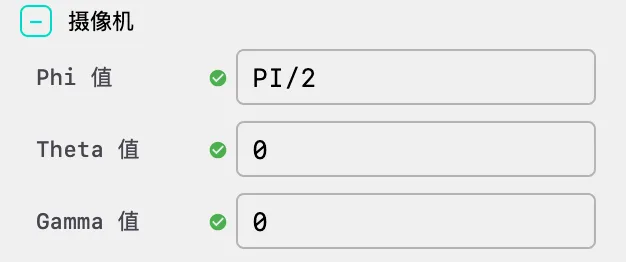
Camera Angles
| Parameter | Description | Unit | Example |
|---|---|---|---|
| phi | Camera azimuth angle (horizontal rotation) | Radians | PI/4 |
| theta | Camera polar angle (vertical rotation) | Radians | PI/6 |
| gamma | Camera roll angle (rotation) | Radians | 0 |
Tip: Camera angle input fields support mathematical expressions such as
PI/4,PI/3. You can also use custom parameters for parameter-driven camera animation.
Common Viewing Angles:
| View | phi | theta | gamma | Description |
|---|---|---|---|---|
| Front | 0 | 0 | 0 | View from directly in front |
| Top-down | PI/2 | 0 | 0 | View from directly above |
| 45° Isometric | PI/4 | PI/4 | 0 | Classic isometric view |
| Side | 0 | PI/2 | 0 | View from the side |
4. Formulas (Formula Display)
Display LaTeX mathematical formulas in the scene for teaching demonstrations and documentation.
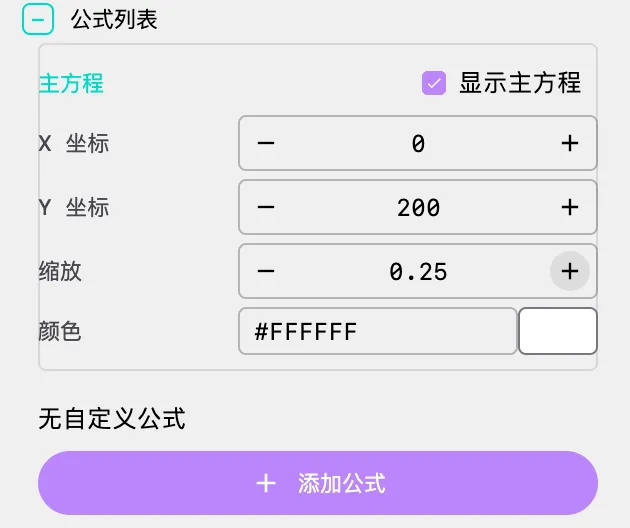
Main Equation
| Parameter | Description | Default |
|---|---|---|
| show_main_equation | Whether to display the main equation | Off |
| x | X coordinate of the main equation display position | 0 |
| y | Y coordinate of the main equation display position | 200 |
| scale | Scale ratio of the main equation | 1.0 |
| color | Color of the main equation | #FFFFFF |
Tip: The main equation is typically used to display the mathematical definition of the current surface. The system automatically generates LaTeX formulas based on the current equations.
Additional Formulas
Click the Add Formula button to add multiple formulas, each containing:
| Parameter | Description | Example |
|---|---|---|
| latex | LaTeX format formula content | x = r \cos(u) \sin(v) |
| x | X coordinate of the formula display position | 0 |
| y | Y coordinate of the formula display position | 300 |
| scale | Scale ratio of the formula | 1.0 |
| color | Color of the formula | #FFFFFF |
Applications:
- Step-by-step demonstration of mathematical derivations
- Display multiple related formulas
- Add annotations and explanatory text
Note: Formula positions use screen coordinates with the top-left corner as origin, X-axis pointing right, and Y-axis pointing down.
5. Appearance (Appearance Settings)
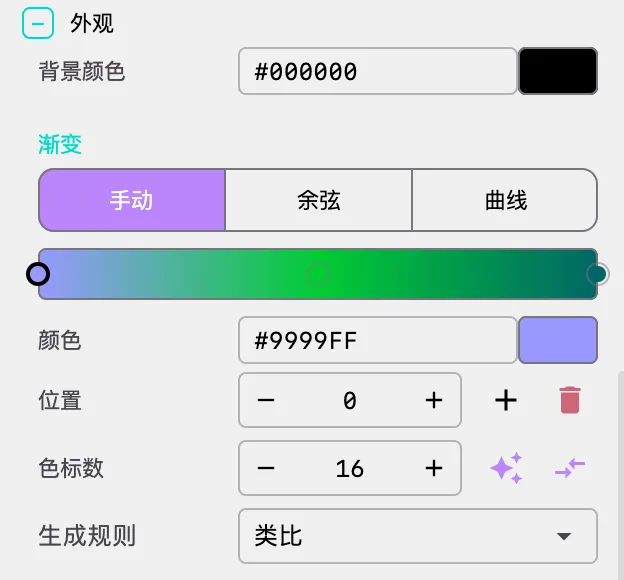
Background Color
- background_color: Scene background color. Dark backgrounds (e.g., black #000000) typically highlight surface details and colors better.
Points & Lines (POINTS Mode)
| Parameter | Description | Default |
|---|---|---|
| dot_size | Particle point size | 1.68 |
| line_weight | Trail line weight | 1.0 |
Trail Effects (POINTS Mode, CPU Only)
| Parameter | Description | Default | Recommended Range |
|---|---|---|---|
| show_trails | Show motion trails | Off | — |
| fade_trails | Trail fade-out effect | Off | — |
| trail_lifetime | Trail duration in seconds | 5 | 5-10 seconds |
Important Warning:
trail_lifetimeexceeding 15 seconds may cause excessive memory usage. Recommended range: 5-10 seconds.
Palette (Color Gradient)
Parametric surfaces use a 1D LUT (lookup table) texture for coloring, supporting three gradient modes:
Manual Mode:
- Click gradient bar to add color control points
- Drag control points to adjust positions
- Double-click control points to modify colors
- Supports up to 25 color control points
- Choose from random strategies (monochromatic, analogous, complementary, split-complementary)
Cosine Mode:
- Uses the IQ cosine palette formula: color(t) = a + b · cos(2π(c·t + d))
- Independently control offset, amplitude, frequency, and phase for R/G/B channels
- Supports one-click randomization and application
- Ideal for creating rainbow, metallic, and other continuous gradient effects
Curve Mode:
- Control R/G/B channels independently through editable Bézier curves
- Provides the most flexible color control
- Supports one-click randomization and application
Important: For closed surfaces, the system automatically detects and applies cyclic gradients to ensure smooth color transitions at seams. If issues persist, manually adjust the palette to ensure first and last colors match.
6. Parameters (Custom Parameters)
Define custom variables here that can be directly referenced in geometry formulas. Each parameter includes:
- Name: Parameter name (e.g.,
a,R,r, etc.) - Value: Parameter value (supports decimals)
Adding Parameters: Enter the parameter name and initial value in the input fields at the bottom, then click the add button.
Deleting Parameters: Click the delete button to the right of the parameter.
Dynamic Effects: Modifying parameter values updates the surface shape in real-time, useful for:
- Exploring the influence of parameters on surface morphology
- Creating dynamic effects with parameter animation
- Quickly switching between different parameter combinations
🎬 Animation and Timeline
Parametric surfaces support a rich set of animation types, and complex animation sequences can be orchestrated through the timeline system.
1. Parameter Flow Animation
By setting speed_u and speed_v, particles flow along parametric curves, creating fluid effects.
Configuration Steps:
- Set
speed_uandspeed_vto non-zero values (e.g., 0.15) in the Settings panel - If the surface is closed, enable
periodic_uandperiodic_v - Enable
flowing_uandflowing_v(for seamless looping) - Adjust
trail_lifetimeto control trail length (CPU mode)
Applications: Visualizing flow fields, magnetic field lines, contour flow on surfaces, etc.
2. Parameter Oscillation Animation
Through the paramStart / paramStop actions in the timeline, custom parameters undergo periodic sinusoidal oscillation within a specified range, achieving dynamic evolution of surface morphology.
How It Works:
- For each parameter, specify the oscillation step and range (min, max)
- The parameter value oscillates sinusoidally within [min, max]:
value = mid + amp * sin(phase) - Oscillation speed is controlled by the step
- Individual parameter oscillation can be enabled/disabled
Configuration Method:
Add a paramStart action in the timeline, then add the parameters to animate:
{
  "type": "animate",
  "duration": 10.0,
  "easing": "SINE_IN_OUT",
  "actions": [
    {
      "method": "paramStart",
      "args": [{
        "targetDomain": "SURFACE",
        "parameters": {
          "a": {
            "enable": true,
            "step": 0.01,
            "min": 0.02,
            "max": 0.08
          }
        }
      }]
    }
  ]
}
Animatable Parameters:
All custom parameters defined in the Parameters panel support animation. Additionally, the following domain parameters are supported:
| Parameter | Description | Default Oscillation Range |
|---|---|---|
| scale | Overall scale | 0.5 - 1.5 |
| phaseDensity | Phase density | 5.0 - 10.0 |
| modDensity | Modulation density | 5.0 - 10.0 |
| phaseSharpness | Phase sharpness | 0.001 - 2.0 |
| modSharpness | Modulation sharpness | 0.001 - 2.0 |
3. Camera Animation
Achieve view changes such as orbiting, zooming, and panning through the timeline system.
Available Camera Animation Methods:
| Method | Description | Parameters |
|---|---|---|
| rotatePhi | Rotate azimuth angle | delta (radians increment) |
| rotateTheta | Rotate polar angle | delta (radians increment) |
| rotateGamma | Rotate roll angle | delta (radians increment) |
| rotateTo | Rotate to specified angles | phi, theta, gamma |
| zoom | Zoom | zoomLevel |
| focal | Adjust focal length | focalLength |
| track | Track particle | index |
| stopTracking | Stop tracking | None |
| ambient | Orbit rotation | phi_speed, theta_speed, gamma_speed |
| stopAmbient | Stop orbiting | None |
4. Gradient Animation
Through gradientStart / gradientStop actions, palette colors change over time.
Gradient Animation Modes:
| Mode | Description |
|---|---|
| HUE_ROTATE | Hue rotation, colors cycle along the color wheel |
| OFFSET_CYCLE | Offset cycle, colors shift along the gradient bar |
| CROSS_FADE | Cross fade |
| PALETTE_MORPH | Palette morphing |
Interpolation Methods:
| Method | Description |
|---|---|
| OKLAB | OKLAB color space interpolation (recommended, perceptually uniform) |
| OKLCH | OKLCH color space interpolation |
| LINEAR | Linear RGB interpolation |
| RGB | Standard RGB interpolation |
5. Surface Mode Transition Animation
Through the SurfaceModeTransition animation type, you can smoothly transition between POINTS and MESH modes.
Configuration Method:
Add a SURFACE_MODE_TRANSITION type clip in the timeline and set the target mode (POINTS or MESH).
Configuration Example: Cornucopia Scene Animation
Here is a complete timeline configuration example demonstrating the animation choreography for the Cornucopia scene:
{
  "timeline": [
    {
      "type": "wait",
      "duration": 4.0,
      "easing": "SINE_IN_OUT"
    },
    {
      "type": "animate",
      "duration": 10.0,
      "easing": "SINE_IN_OUT",
      "actions": [
        {"method": "rotatePhi", "args": [6.283]}
      ]
    },
    {
      "type": "animate",
      "duration": 0.5,
      "easing": "SINE_IN_OUT",
      "actions": [
        {"method": "ambient", "args": [0.3, 0.3, 0.3]}
      ]
    },
    {
      "type": "animate",
      "duration": 5.0,
      "easing": "SINE_IN_OUT",
      "actions": [
        {"method": "zoom", "args": [5]},
        {"method": "focal", "args": [3.8]}
      ]
    },
    {
      "type": "animate",
      "duration": 5.0,
      "easing": "LINEAR",
      "actions": [
        {"method": "zoom", "args": [0.8]},
        {"method": "focal", "args": [25]}
      ]
    },
    {
      "type": "animate",
      "duration": 0.5,
      "easing": "SINE_IN_OUT",
      "actions": [
        {"method": "stopAmbient", "args": []}
      ]
    },
    {
      "type": "align",
      "duration": 12.0,
      "easing": "LINEAR",
      "target_phi": 0,
      "target_theta": 0,
      "target_gamma": 1.5708
    }
  ]
}
📐 Classic Parametric Surface Examples
Cornucopia
The Cornucopia is the representative example of this scene, demonstrating how exponential functions create elegant spiral surfaces.
Equations:
x = exp(b*v) * cos(v) + exp(a*v) * cos(u) * cos(v)
y = exp(b*v) * sin(v) + exp(a*v) * cos(u) * sin(v)
z = exp(a*v) * sin(u)

Parameters: a = 0.05, b = 0.055
Domain: u ∈ [-2*TWO_PI, 2*TWO_PI], v ∈ [0, TWO_PI]
Render Mode: CPU, POINTS
Particles: 33 × 28
Flow Speed: speed_u = 0.15, speed_v = 0.15
Trails: enabled, fade, 5 seconds
Sphere
Equations:
x = cos(u) * sin(v)
y = sin(u) * sin(v)
z = cos(v)

Domain: u ∈ [0, TWO_PI], v ∈ [0, PI]
Render Mode: GPU, MESH
Mesh Segments: 60 × 60
Wrapping: wrap_u = On, wrap_v = Off
Torus
Equations:
x = (R + r * cos(v)) * cos(u)
y = (R + r * cos(v)) * sin(u)
z = r * sin(v)

Parameters: R = 1.0, r = 0.4
Domain: u ∈ [0, TWO_PI], v ∈ [0, TWO_PI]
Render Mode: GPU, MESH
Wrapping: wrap_u = On, wrap_v = On
Möbius Strip
Equations:
x = (1 + t/2 * cos(u/2)) * cos(u)
y = (1 + t/2 * cos(u/2)) * sin(u)
z = t/2 * sin(u/2)

Domain: u ∈ [0, TWO_PI], t ∈ [-1, 1]
Render Mode: GPU, MESH
Note: The Möbius strip is non-orientable; wrap_u should not be enabled
Helicoid
Equations:
x = u * cos(v)
y = u * sin(v)
z = 0.5 * v

Domain: u ∈ [-2, 2], v ∈ [0, TWO_PI]
Render Mode: GPU, MESH
Flow Effect: speed_v = 0.2, periodic_v = On, flowing_v = On
🚀 Performance & Best Practices
Recommended Configurations
| Goal | Render Mode | Surface Mode | Segments | Trails | Performance |
|---|---|---|---|---|---|
| High-quality video export | CPU | POINTS | 50-100 | 5-10s | 30-60 FPS |
| Real-time smooth preview | GPU | POINTS | 200+ | N/A | 60+ FPS |
| Large-scale point clouds | GPU | POINTS | 300+ | N/A | 30-60 FPS |
| Smooth surface display | GPU | MESH | 60-100 | — | 60 FPS |
| Teaching demonstration | CPU | POINTS | 30-50 | 5s | 60 FPS |
Performance Optimization Tips
Render Mode Selection:
- Need trail effects → Use CPU mode
- Need high-resolution particles → Use GPU mode
- Need materials and textures → Use GPU MESH mode
Resolution Control:
- Total particle count = u_segments × v_segments
- CPU mode recommended maximum: 100×100 (10,000 particles)
- GPU mode can reach 200×200 or higher (40,000+ particles)
- MESH mode: 60-100 segments are typically smooth enough
Trail Optimization:
trail_lifetimeshould not be too long; recommended 5-10 seconds- Enable
fade_trailsfor natural trail fade-out with better visual results - Excessively long trails consume significant memory
Closed Surface Handling:
- Correctly set parameter domain ranges (e.g., )
- Enable
periodic_uorperiodic_v(for POINTS mode flow) - Enable
wrap_uorwrap_v(for MESH mode stitching) - Adjust
wrap_thresholdto optimize seams (default 0.25)
❓ Troubleshooting
Interface Lag
Problem: Interface stutters or lags during operation
Cause: Too many particles or excessive trail duration
Solutions:
- Reduce
u_segmentsandv_segments - Reduce
trail_lifetime - Switch to GPU mode (note: GPU mode does not support trails)
No Trail Effects
Problem: show_trails is enabled but no trails are visible
Cause: Running in GPU mode
Solution: Switch to CPU mode and enable show_trails
Mesh Gaps at Seams
Problem: In MESH mode, closed surfaces have gaps at the seams
Cause: Incorrect wrapping settings
Solutions:
- Check if parameter domain ranges are correct (e.g., sphere )
- Enable
wrap_uorwrap_v - Adjust
wrap_thresholdvalue (increasing the threshold can stitch larger gaps)
Incomplete Surface Display
Problem: Only part of the surface is displayed
Cause: Improper parameter domain range settings
Solutions:
- Check if
u_min,u_max,v_min,v_maxcover the complete parameter range - Check if Scale is too large causing the surface to extend beyond the viewport
- Adjust Offset to bring the surface into view
Discontinuous Colors at Seams
Problem: Colors on closed surfaces show abrupt changes at seams
Cause: Palette not applying cyclic gradient
Solution: The system automatically detects closed surfaces and applies cyclic gradients. If issues persist, manually adjust the palette to ensure first and last colors match.
Formula Input Errors
Common Errors:
- Misspelled function names (e.g.,
Sinshould besin,Cosshould becos) - Undefined parameter names (must define in Parameters panel before referencing in equations)
- Mismatched parentheses
- Division by zero or negative square roots
Solution: Check formula syntax, ensure all parameters are defined, and avoid mathematically illegal operations. Input fields display real-time validation results.
Abnormal Particle Flow Direction
Problem: Flow mode is enabled but particles move in unexpected directions
Cause: flowing mode not used with periodic, or periodic enabled on a non-closed surface
Solutions:
flowingmode must be used withperiodic- Only enable
periodicfor closed surfaces (where parameter domain start and end correspond to the same position) - Non-closed surfaces should use ping-pong mode (do not enable
flowing)
🎨 Creative Techniques
Parameter Exploration
- Start from Classic Surfaces: Choose a classic surface (e.g., sphere, torus) as a starting point and gradually modify equations
- Extract Parameters: Extract constants from equations as custom parameters for easy adjustment and animation
- Small Steps: Modify only one parameter or one term in the equation at a time to observe changes
- Mix Equations: Try combining equations from two surfaces to create new forms
Visual Tuning
Render Mode Selection:
- Display surface form → MESH mode with fill and wireframe
- Display flow effects → POINTS mode with CPU rendering and trails
- High particle density → POINTS mode with GPU rendering
Color Schemes:
- Use cosine palette mode to quickly generate harmonious color schemes
- Dark backgrounds with high-saturation colors typically produce the best results
- For closed surfaces, ensure first and last colors match
Camera Angles:
- 45° isometric view is suitable for displaying 3D form
- Camera orbit animation can showcase the surface from all angles
- Focal length adjustment can change perspective effects
Animation Design
Parameter Oscillation:
- Set oscillation animations for custom parameters to observe continuous morphological changes
- Different parameters oscillating at different rates create complex morphological evolution
- Ideal for creating morphing teaching animations
Particle Flow:
- Set speed_u and speed_v to make particles flow along the surface
- Combine with trail effects to show flow field direction
- Enable flowing mode for perfect loops
Camera Movement:
- Orbit animation (ambient) can showcase the surface from all angles
- Zoom animation can reveal fine structural details
- Tracking (track) can make the camera follow a specific particle
Gradient Animation:
- Hue rotation (HUE_ROTATE) creates rainbow flow effects
- Offset cycle (OFFSET_CYCLE) makes colors flow along the surface
- Combine with OKLAB interpolation for natural color transitions
Formula Writing Tips
- Use Custom Parameters: Extract constants from formulas as parameters for easy adjustment and animation
- Mind Parameter Ranges: Ensure formulas are well-defined throughout the parameter domain, avoiding division by zero, negative square roots, etc.
- Utilize Periodicity: For periodic functions, parameter domains can be set to or
- Piecewise Functions: Use
min,max,absfunctions to achieve piecewise effects - Exponential Functions:
exp()can create increasing/decreasing spiral effects (e.g., Cornucopia)
🔧 Technical Details
Rendering Pipeline
Parametric surfaces use different rendering pipelines depending on render mode and surface mode:
POINTS + CPU Mode:
- CPU calculates each particle's position
- Supports trail effects: records particle history positions, draws as line segments
- Supports line weight adjustment and fade effects
- Ideal for high-quality video export
POINTS + GPU Mode:
- GPU shaders compute particle positions in parallel
- Uses textures to store particle state
- Does not support trail effects
- Supports real-time rendering of millions of particles
MESH Mode:
- Generates triangle mesh based on segment count
- Vertex shader computes mesh vertex positions
- Fragment shader handles lighting, materials, and textures
- Supports fill, wireframe, and procedural textures
Seam Stitching Algorithm
For closed surfaces, MESH mode uses a stitching algorithm to eliminate seams:
- Detects mesh vertices at the start and end of the parameter domain
- When the distance between endpoints is less than
wrap_threshold × diagonal length, they are identified as the same vertex - Merges these vertices to generate a continuous triangle mesh
- Automatically adjusts texture coordinates to ensure color continuity at seams
Parameter Animation System
Parameter animation for parametric surfaces is implemented through SurfaceParameterAnimator:
- Supports sinusoidal oscillation animation for custom parameters
- Each parameter independently controls step, range, and enable state
- Animation parameters are passed to GPU shaders through Uniform variables without recompilation
- Supports smooth start and stop
💡 Advanced Topics
Understanding Geometric Properties of Parametric Surfaces
The geometric properties of parametric surfaces are determined by the first and second fundamental forms:
- First Fundamental Form: Describes the metric on the surface (distances, angles, areas), determined by the inner products of partial derivatives and
- Second Fundamental Form: Describes the curvature of the surface, determined by the surface normal and second-order partial derivatives
- Gaussian Curvature: , where and are the principal curvatures. Points with positive Gaussian curvature are elliptic (e.g., sphere), negative are hyperbolic (e.g., saddle), and zero are parabolic (e.g., cylinder)
Creating Custom Surfaces
While the system provides equations for classic surfaces, you can create entirely new surface forms by modifying equations:
- Deformation: Add perturbation terms to existing equations, e.g.,
x = ... + a * sin(3*u) * cos(2*v) - Blending: Weighted combination of two surface equations, e.g.,
x = t * f1(u,v) + (1-t) * f2(u,v) - Parameterization: Replace constants in equations with adjustable parameters to explore parameter space
- Composition: Use the output of one surface as input to another
CPU vs GPU Mode Selection Strategy
| Consideration | CPU Mode | GPU Mode |
|---|---|---|
| Trail effects | ✅ Supported | ❌ Not supported |
| Particle count | ≤ 10,000 | ≤ 400,000+ |
| Rendering precision | High | Medium |
| Real-time performance | Medium | High |
| Video export | Recommended | Available |
| Material textures | ❌ Not supported | ✅ Supported (MESH mode) |
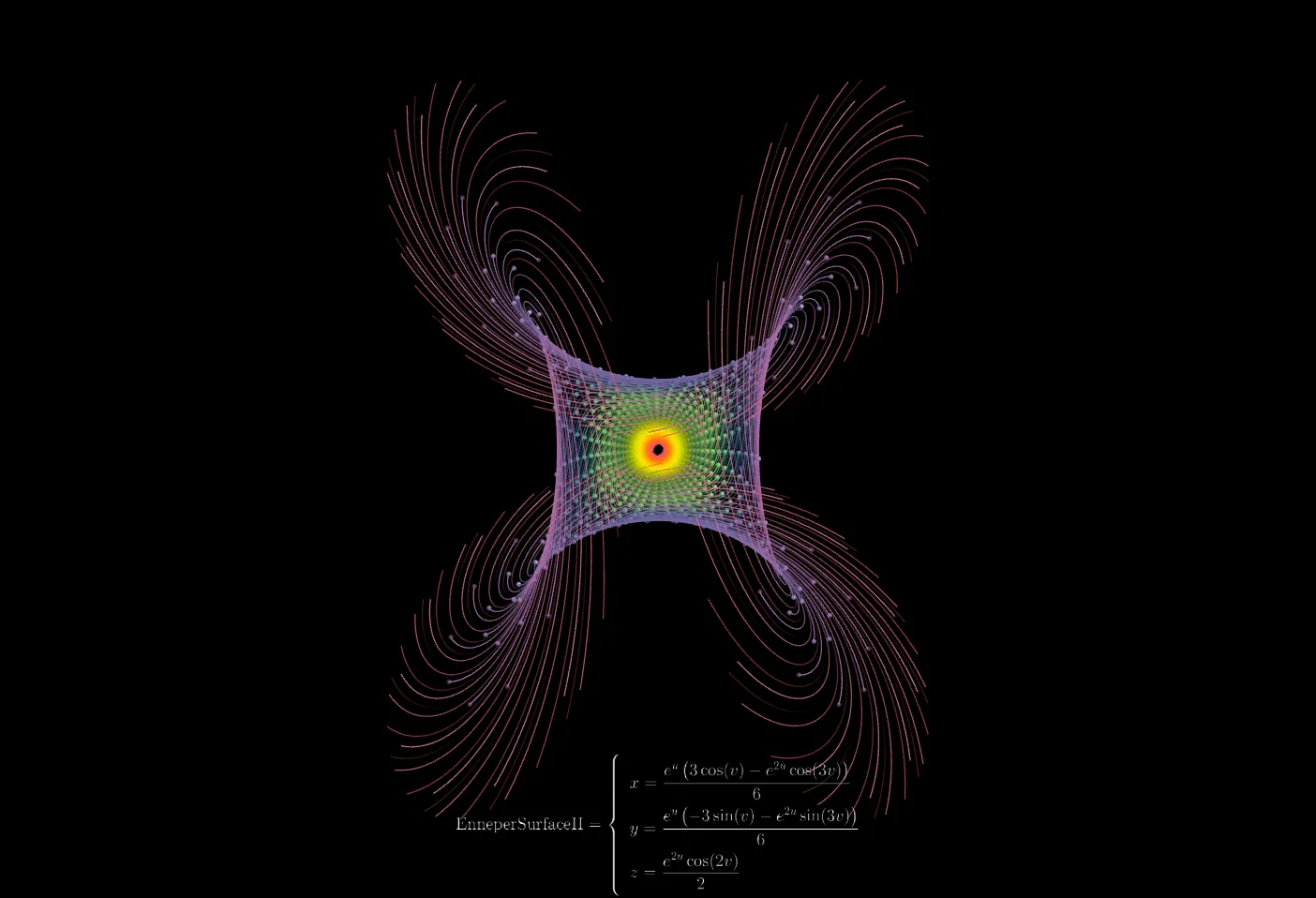
🖼️ More Visual Examples
📚 References
Mathematical Theory
- Carl Friedrich Gauss - Disquisitiones Generales circa Superficies Curvas (1827)
- Manfredo P. do Carmo - Differential Geometry of Curves and Surfaces
- Erwin Kreyszig - Differential Geometry
Online Resources
- Wikipedia: Parametric Surface
- Wikipedia: Differential Geometry of Surfaces
- MathWorld: Parametric Surface
- 3D Surface Gallery - Rich collection of parametric surface examples
Software Documentation
- OpenGL Shader Programming Guide
- GLSL Language Specification